Reading journal for paper books
Keep your books and the lines you never want to forget
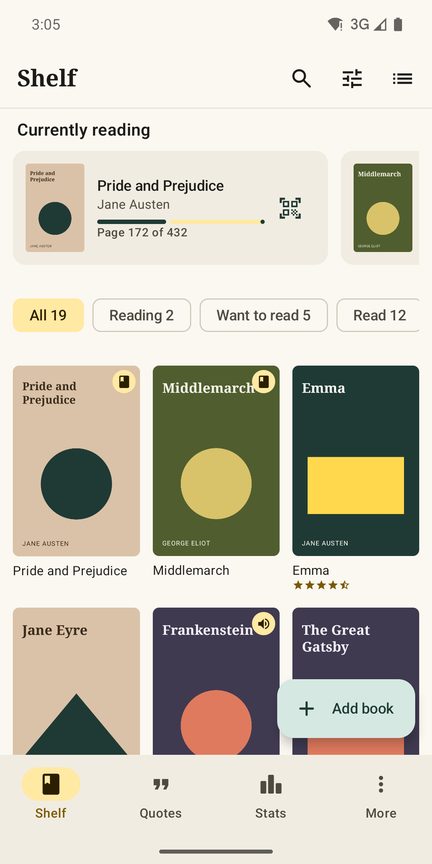
Booklit is a book tracker and reading journal for people who read on paper. Scan the barcode and the book is on your shelf. Photograph a page, swipe over the sentences with your finger like a highlighter, and the quote is saved with its page number. No account, no ads, no subscription.
Coming soon on Google Play, for Android.
How it works
Scan the book, swipe the page, keep the quote
You want to read, not type. Booklit does the typing for you, from the barcode on the back to the sentence on page 212.
Scan the barcode
Point the camera at the ISBN barcode on the back and the book is on your shelf, with title, author, number of pages and cover. Got a whole stack? Scan them in a row. Or search by title or author.
Photograph the page
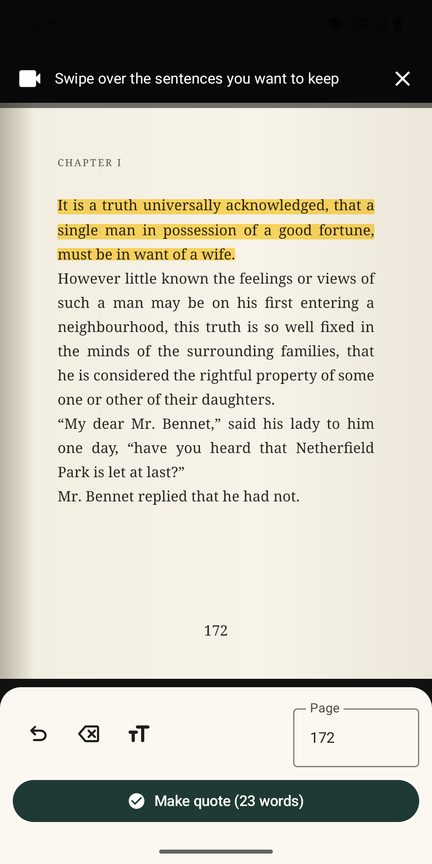
Found a sentence worth keeping? Take a photo of the page and swipe over the lines with your finger, like a highlighter. The text is recognised on your phone, in the right order, with hyphenated words joined again.
Keep it with the page number
Booklit finds the page number for you. Check the text, add your own thoughts, mark it as a favourite. Every quote stays with its book, ready to find again in years.
Quotes
Book quotes in three seconds, not three minutes
Copying a quote by hand means finding a pen, losing your place and giving up halfway. With Booklit you keep reading after a photo and a swipe.
- Swipe like a highlighter over exactly the sentences you want. An eraser takes off what you did not mean.
- Lines in the right order, and words split with a hyphen at the end of a line are joined again.
- The page number is found for you on the photo. Not on the page? Type it yourself.
- Seven reading languages built in: English, German, Dutch, French, Spanish, Italian and Portuguese books. You set the language per book.
- Edit and add your thoughts. Correct a letter, add what the sentence made you think, mark favourites.
- Search everything: all quotes, books and notes at once.
- Type or share a quote too, for example from an e-book or a web page: share the text from another app to Booklit.
The photo is used for the text recognition on your phone and then deleted, unless you choose to keep the photo of the page with the quote.
Shelf
Track books the way you read them
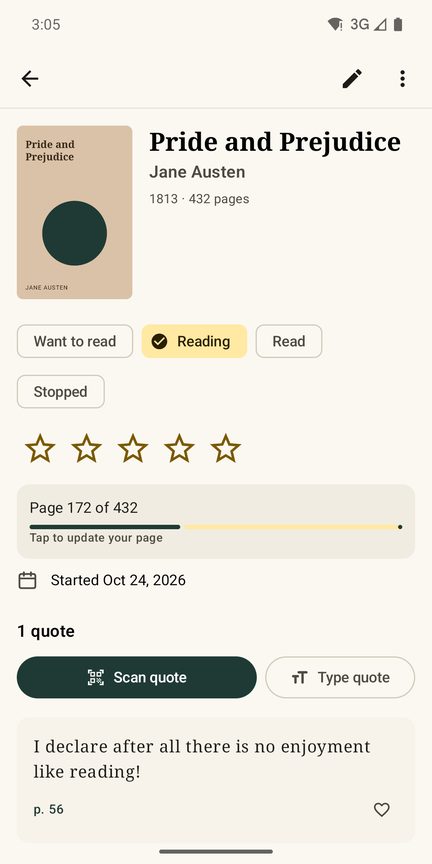
Your reading list, the books on your nightstand and everything you have read, on one shelf without a limit on the number of books.
Want to read, reading, read, stopped
Four statuses that match real life. Stopped halfway is allowed: the book stays on your shelf with the quotes you took.
Dates, also afterwards
Start and finish dates, filled in when you start or months later. Read it again? Re-reads get their own dates.
Ratings with half stars
Because some books are a three and a half. Sort your shelf by rating, title, author or what you added last.
Who, from whom, to whom
Note who recommended a book, who you borrowed it from (a friend or the library) and who you lent it to, so it comes back.
Paper, e-book and audiobook
Booklit is made for paper books, but your e-books and audiobooks belong on the same shelf and in the same reading log.
Books in your language
Book details come from Open Library and, for Dutch, German and French books, also from the national library. A book nobody knows? Enter it yourself.
Reading goal
Your year in books
Set a goal for the year and see at a glance whether you are on track, ahead or a few books behind. Booklit counts the books, quotes and pages you read this year.
With Booklit Plus you also see every month, all your years, your average rating and the authors you read most.
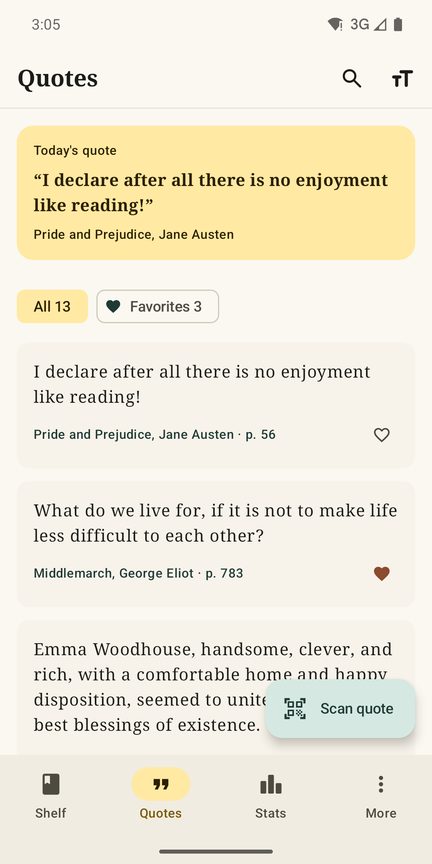
A quote of the day from your own books
Every day Booklit picks a sentence from a book you read, with title, author and page. In the app it is free; with Plus it also comes as a notification at the time you choose, and as a widget on your home screen.
Your data
Bring your books, take them with you
Already keep a reading log elsewhere? Import the CSV export from the big book sites, and the highlights file of your e-reader, and your books and quotes are on your shelf.
Going the other way is just as easy: export all quotes as Markdown for your notes, per book with page numbers and your thoughts, or your books and quotes as CSV for a spreadsheet. With Plus you make a neat PDF per book with all its quotes.
A new phone
Years of reading should not disappear
Everything is on your phone, so we make sure it survives a new one. One backup file holds all your books, quotes and covers: save it somewhere safe and open it on the new phone. Booklit also takes part in the Android backup to your own Google account. Booklit Plus comes back through your Google account.
Price
Free without limits, Plus with one payment
Everything you need to track books and keep quotes is free, without ads and without a limit on books or quotes. Booklit Plus adds a few extras for one payment in Google Play, for less than a paperback. No subscription, now or later.
Free
€0
For as long as you like, without ads
- Unlimited books and quotes
- Scanning barcodes and pages, also a whole stack
- Statuses, half stars, dates, re-reads, lending
- Reading goal with this year's books, quotes and pages
- Quote of the day in the app
- Import, export as Markdown and CSV, backup file, dark mode
Booklit Plus
€3.99
One payment, no subscription
- Full stats: per month, pages, all your years
- Quote of the day as a notification and widget
- A PDF per book with all your quotes
- Share quotes as a beautiful image
- Your own shelves, as many as you like
What you have entered is never locked: without Plus you can always see, search and export every book and quote. The price is €3.99 in the Netherlands, including VAT. Google Play converts it for every country, so it can differ a little where you live; Google Play shows you the exact price in your own currency before you buy. Plus is linked to your Google account, so it also works on a new phone.
Privacy
What you read is your business
Your reading life says a lot about you. That is why your books, quotes and notes stay on your phone, and we never see them.
No account
No sign-up, no password, no profile. Open the app and start reading. No ads, no analytics, no tracking.
Pages stay on your phone
Text recognition runs on your phone. The photo of the page is not sent anywhere and is deleted afterwards, unless you choose to keep it.
Only the ISBN goes out
To look up a book, only the ISBN or your search term goes to Open Library or a national library. Nothing about you. You can turn looking up off.
You decide where it goes
The backup file and exports go only where you send them. Android backup goes to your own Google account. Read more in the privacy policy.
Questions
Frequently asked questions
Are my pages sent anywhere to read the text?
No. The text recognition is built into the app and runs on your phone, also without internet. The photo of the page is deleted after recognition, unless you turn on "Keep the photo of the page". We never receive your photos or quotes.
Which languages can Booklit read?
Text recognition is built in for books in English, German, Dutch, French, Spanish, Italian and Portuguese. You choose the language per book; by default it is the language of your phone. The app itself is available in 21 languages.
Is there a limit on books or quotes?
No. The free version has no limit on books, quotes or scans, and no ads. Booklit Plus adds extras such as full stats and a PDF per book, but never unlocks something you need to keep your reading log.
Does Booklit need an internet connection?
Only to look up a book by ISBN or title and to fetch its cover. Everything else works offline: scanning pages, quotes, your shelf, stats and backups. Without a connection, or with looking up turned off, you enter the book yourself.
Can you bring your books from another app or site?
Yes. Booklit imports the CSV export from the big book sites and the highlights file of an e-reader. Nothing on your shelf is removed by an import; books and quotes are added.
What about a quote from an e-book?
Select the text in your e-book app or browser and share it to Booklit, or type it in. E-books and audiobooks have their own place on your shelf next to paper.
Can you share a quote?
Yes, as text, always with the title and author of the book. With Booklit Plus you can also share it as an image. Quotes are for your own use: share a sentence, not whole pages.
What happens when you get a new phone?
Make a backup file before you switch and open it on the new phone: all books, quotes and covers are back. Android backup and moving with a cable or directly from the old phone also bring everything along. Booklit Plus comes back through your Google account.
Which phones does it work on?
Booklit is for Android phones with Android 8 or later. Scanning barcodes and pages needs a camera; without one you can search books by title and type your quotes.